Use this guide when calling your dedicated AutoCall number to listen to messages, record a new broadcast, resend your latest recording, or reach customer service.
If your AutoCall is set to secure, only callers on the list will be able to listen to the messages.
You will hear keypad options to play messages, record and send, resend your latest recording, or hear customer service.
When sending, choose 1 for everyone, or enter a specific sub group number if they are enabled. All entries must be followed by #. If you enter an invalid number, the available sub groups will be listed and you will be able to try again.
Plays the current recording. If no recording exists yet, the system tells you there are no messages.
Cycles through older recordings (Up to 7 stored). After the oldest available file, it resets back to the first previous message.
Requires your group password. Allows you to record a new message and send it to your list of contacts, or a specific subset of contacts. (sub groups). You may listen to your message and re-record if you are not happy with it before sending.
During recording, press any key to stop recording and go to the review menu.
Requires your group password. Sends your latest recording without creating a new one. If you have sub groups, you may send to one or more just like recording a new message.
If you need to review the latest recording, press 1 when you first call in.
The system reads your configured customer-service phone number digit by digit.
After recording a new message, you get a review menu:
If some contacts are hard to reach, the system keeps working through retries automatically and reports progress along the way.
AutoCall retries numbers that are still not reached, while tracking each attempt per contact.
After your configured retry threshold (commonly 3 attempts), an In Progress report can go out showing completed calls and pending calls.
Retries continue (many groups use up to 7 total attempts) until remaining calls are finalized as answered, voicemail, or failed.
Polling happens on outbound broadcast calls. Ask the question in your recorded message and tell listeners which button to choose.
In your recording, list your options and tell listeners which number to press. For example: "For yes, press 2. For no, press 3."
Poll responses are captured on digits 2-8. These are saved per recipient and will be tallied in your reporting.
1 repeats the message and 9 reads the customer service number, so avoid using those two for poll choices.
After your broadcast completes, you receive an email report with totals and delivery outcomes for that call run.
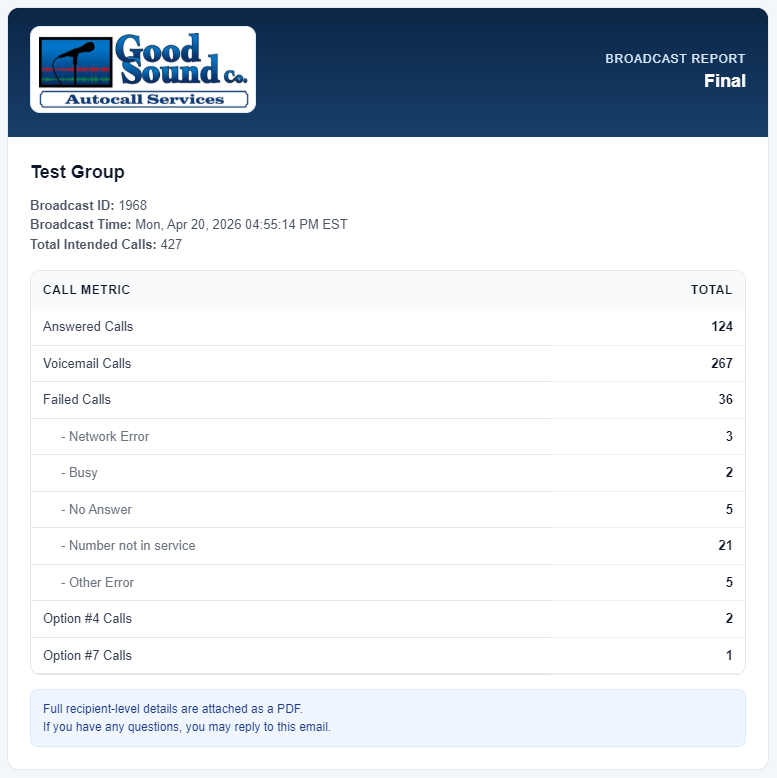
Tip: Keep poll choices consistent in your recording so option totals are easy to interpret from report to report.
If no selection is entered, the main menu repeats up to 3 attempts before ending the call with goodbye.
AutoCalls sent outside your configured calling window are queued and delivered the next day when your allowed window opens.
If your account has sub groups, enter the group number and press #. Sub group 1 sends to everyone.
Invalid password or invalid menu/group entries prompt an error message and return you to the relevant menu.
If you need updates to menu prompts, password flow, or group routing behavior, contact your AutoCall administrator team.
Request Setup Support